ComfyUI
Civitai isn't reading your ComfyUI image metadata? Here's why (and how to fix it)
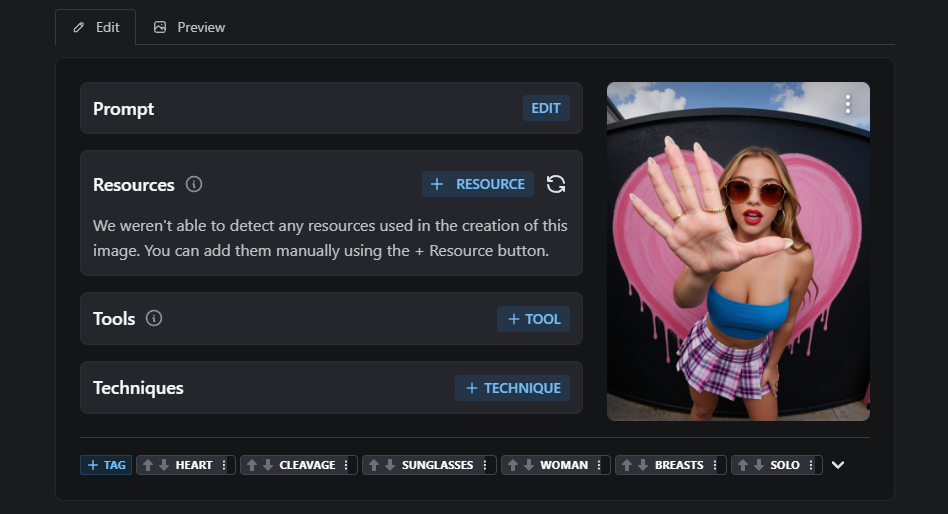
If you've ever uploaded an image to Civitai and seen that horrible "No metadata" tag show up under your post, you know the feeling. You spent hours dialing in the perfect workflow, tweaking the prompt, testing LoRAs, and the moment you upload, Civitai treats your image like a random screenshot pulled from Pinterest. I've been there. A lot. So I dug into why this happens, and I built a node that actually fixes it. This article is about the why first, because once you understand the why, you can pick whatever solution works for you (mine or someone else's).
The short version
Civitai reads a very specific metadata field called parameters, written in the old Automatic1111 format. The default ComfyUI Save Image node does NOT write that field. It writes the workflow JSON, which Civitai partially understands, but for the public display under each image, Civitai really wants the A1111 format. No A1111 string, no prompt shown. That's already the answer for 80% of cases. But it gets worse when you have a real workflow with custom nodes, and that's where most "save with metadata" nodes silently break.
Why most metadata savers fail on modern workflows
Here's the thing nobody tells you. The custom nodes you find on GitHub that promise to save Civitai-compatible metadata, most of them work fine on a simple workflow. Load checkpoint, type your prompt directly into a CLIPTextEncode, sample, save. Easy case. Metadata works.
But the moment your prompt comes from anywhere else, things break. And in 2025, almost nobody types their prompts directly into a CLIPTextEncode anymore. We use wildcards. We use prompt generators. We use ShowText nodes. We chain a String Concat with a style preset and a subject. We pipe an Img2Prompt node into the encoder. We use LLMs to enrich short prompts.
When that happens, the text input of your CLIPTextEncode is no longer a string. It's a link to another node. And most metadata savers only know how to read literal text. They look at the input, see it's a link, give up, and write an empty prompt. The image saves, Civitai sees no prompt, and you get the "No metadata" tag. This is the silent failure mode that drove me crazy for weeks. The node "works", no error message, no warning, you just get empty metadata.
The Z-Image Turbo and Flux problem
It gets even more interesting on modern model architectures. Z-Image Turbo and Flux often use multiple text encoders, dual conditioning paths, or routing through preset systems. Your prompt might pass through three or four nodes before reaching the sampler.
I ran into this myself building workflows for IntoRealism on Z-Image. My carefully crafted prompts were disappearing in transit. The workflow JSON was embedded correctly, sure, but the A1111 string that Civitai actually displays publicly was either empty or missing critical fields. No public prompt means lower discoverability, fewer people remixing your work, and frankly, it just looks bad.
What a proper fix looks like
To save metadata that Civitai actually displays, you need to do three things, in order.
First, you need to follow the link chain. When the prompt input is a link to another node, the saver has to recursively walk back through the graph until it finds the actual text. That means handling not just text fields but also string, value, prompt, populated_text, output, result, and whatever weird field name the custom node author decided to use.
Second, you need a fallback. Sometimes the prompt is generated dynamically at runtime through a node chain that resolves entirely through links, and there's no clean string to grab from the API prompt. In that case, you need to fall back to the workflow JSON itself and read the widgets_values of the CLIPTextEncode nodes. That's the text the user actually sees in the UI, which is almost always what they want preserved.
Third, you need to handle the polarity. How do you know which CLIPTextEncode is the positive and which is the negative? The most reliable way is to look at the node title. If it contains "neg", it's the negative. Sounds simple, but most metadata savers don't bother with this.
Add a few more details (clean model names by stripping the file path and extension, handle LoRAs with their weights, pick the last KSampler when there are multiple, optionally strip absolute Windows paths from the embedded workflow for privacy) and you have something that actually works on real workflows.
The solution I built
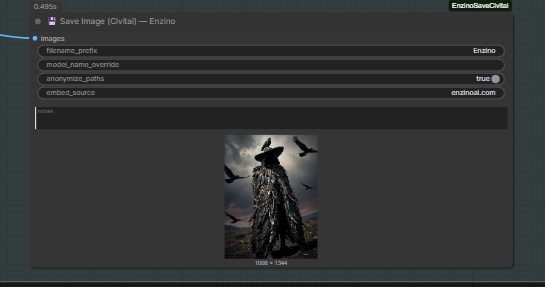
After fighting with this for too long, I built a custom node called Enzino Save Image (Civitai). It does everything I just described, plus a few extras like a custom branding field and notes you can embed in the metadata. I tested it on the workflows I actually use day to day. Z-Image Turbo with multiple LoRAs and ControlNet. Flux Klein face swap pipelines. Qwen Image Edit. SDXL with detailers. The standard SD 1.5 setup. It handles all of them, and crucially, it handles the weird custom node chains that break everything else.
Drop it in your custom_nodes folder, restart ComfyUI, replace your Save Image node with the Enzino one, and that's it. Your Civitai uploads will now show the full prompt, negative prompt, model, sampler, steps, CFG, seed, and LoRAs, just like A1111 images do.
It's free, no signup required, no paywall. You can grab it on enzinoai.com or directly from my Civitai profile.
A word on why this matters
I know it sounds like a small thing. Metadata. Who cares. But on Civitai, metadata is reach. Images with complete metadata get more visibility in model-specific feeds, more remixes, more buzz, more downloads of the underlying model. If you make LoRAs or fine-tunes, broken metadata on your showcase images directly hurts your numbers.
And on a personal level, there's something deeply satisfying about uploading an image and seeing the full recipe laid out underneath it. Other people can study it, replicate it, learn from it. That's how the open AI art community is supposed to work.
So if you've been silently uploading images with no metadata for months, hoping nobody notices, fix it now. Either with my node or any other solution that genuinely follows the link chain. Just stop letting Civitai treat your work like an anonymous JPEG.
If you found this useful, you can support the work and get access to more tools, exclusive LoRAs, and ComfyUI workflows over on Ko-Fi. The Save Civitai node is free for everyone though. It was annoying me too much to keep it locked up.